


Reepl — Five real problems LinkedIn professionals had. Here's how we solved them.
<!--
Work info
-->
Client:
Smartify
Role:
Product Designer • Design Engineer • UX Designer
Year:
2025-2026
The pivot that changed everything
Reepl launched as a commenting tool. Fast AI replies. That was it. When I joined, that was a reasonable starting point — but I could see the market moving somewhere different.
The insight
LinkedIn was shifting from a professional network into a content platform. Only 7.1% of LinkedIn's 1 billion users post regularly — meaning anyone who could post consistently had a massive organic reach advantage. But consistency was the exact thing professionals were failing at. They didn't know what to post. They didn't have time to write. They didn't sound like themselves when they used AI. And they couldn't post on the go from their phones.
Staying a commenting tool meant staying small. The real opportunity was becoming the platform that solves all of this — a LinkedIn copilot that understands you and works for you.
Every feature we shipped after that pivot was a direct answer to a specific, documented problem. Here they are.
5 problems. 5 solutions.
Problem 01
"I don't know what to post about"
The most common reason LinkedIn professionals go silent isn't laziness — it's blank page paralysis. Without a system for finding ideas, most people either copy others or stop posting entirely. Research across 2M+ LinkedIn posts confirms that content idea generation is the #1 barrier to consistency for professionals who aren't full-time creators.
Industry data: 92.9% of LinkedIn users never post. Idea generation is the primary blocker.
Solution 01 — Signals + Idea Feed
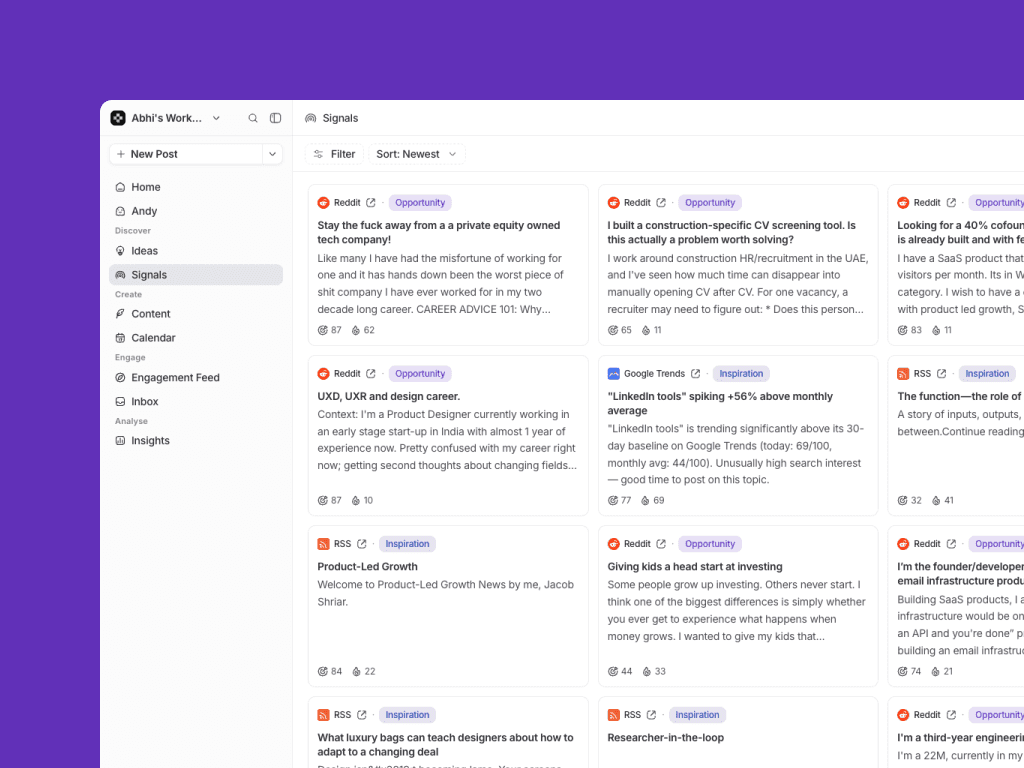
We gave users a feed of what to post before they had to think about it
Signals surfaces what's trending in your domain — pulled from Reddit, YouTube, and LinkedIn itself — so you always know what conversations are happening in your space right now. Idea Feed goes further: it pre-generates post concepts based on your preferences, past content, and goals. You open Reepl and ideas are already waiting. The blank page problem disappears.
Problem 02
"AI content sounds like a robot wrote it"
2025 was the year LinkedIn audiences developed a fine-tuned radar for AI-generated content. Posts that opened with "In today's fast-paced digital landscape" saw engagement collapse. LinkedIn's own algorithm now penalises generic AI output — and users knew it. They wanted AI that helped them write, not AI that wrote instead of them.
2025 data: AI-generated posts saw measurable engagement drops across LinkedIn.
Solution 02 — Voice Profiles
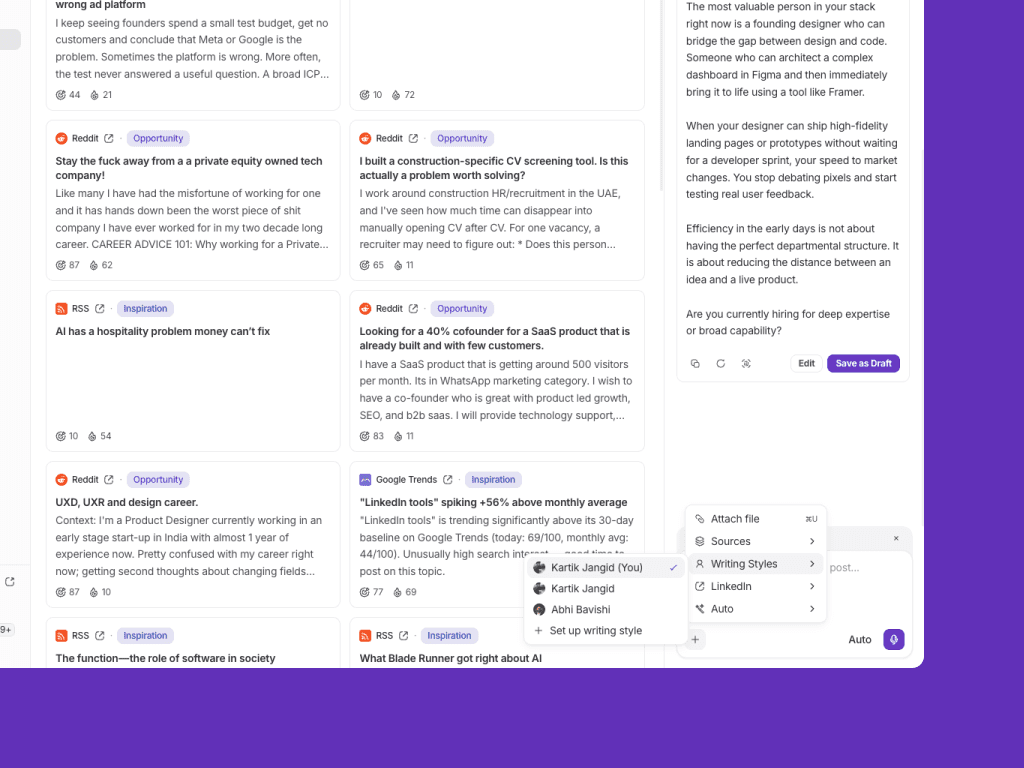
We trained Reepl to sound like the user, not like AI
Voice Profiles let users train Reepl on their existing posts, writing style, and brand guidelines. Every post Reepl generates from that point forward matches their voice — their sentence length, their tone, their vocabulary. For agencies managing multiple brands, each client gets their own voice profile. The AI doesn't replace your voice. It learns it.
Problem 03
"I want to post but I'm never at my desk"
LinkedIn content tools are almost entirely web-first. But professionals — especially those in sales, recruiting, and consulting — are constantly on the move. Existing tools required you to be at a computer to create, approve, and schedule content. For busy professionals, that friction meant they just didn't post.
LinkedIn peak engagement: 7–8AM and 5–7PM — commute hours when nobody's at a desk.
Solution 03 — MCP Connector + Mobile-first Agent
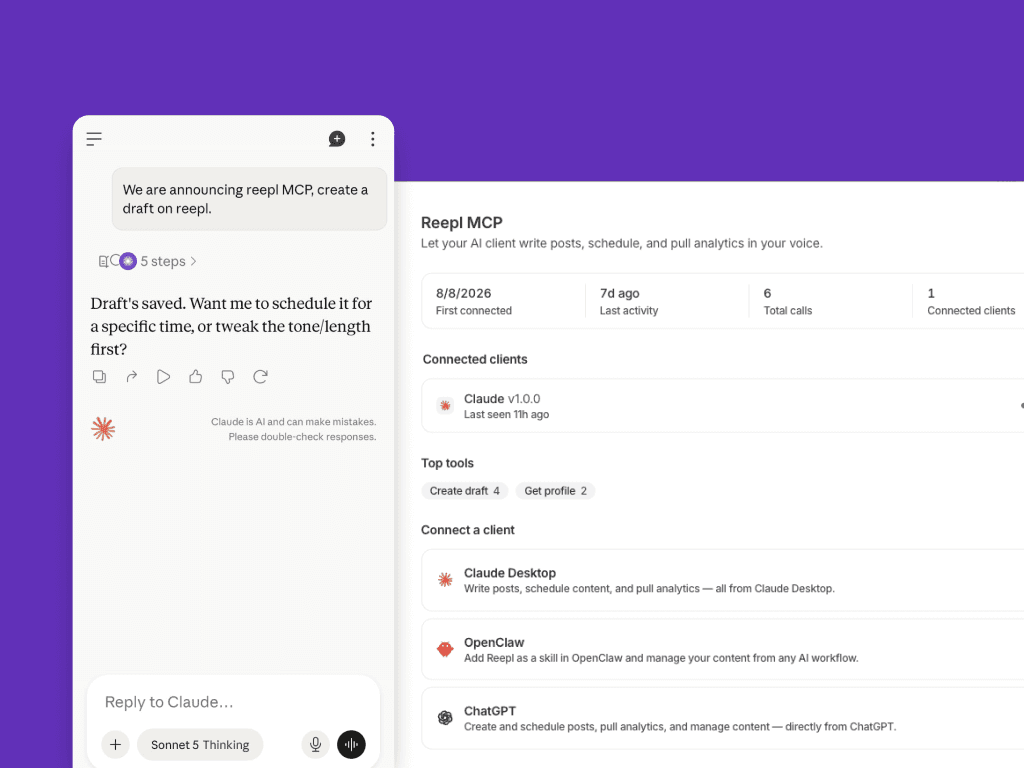
We made LinkedIn content creation possible from anywhere
The MCP connector lets users interact with Reepl through any MCP-compatible interface — including mobile. The AI agent (Andy) runs in the background: it drafts content from your connected sources, queues it for approval, and sends it to you on your phone. You review, approve or edit with one tap, and it schedules. Your LinkedIn presence grows whether you're at your desk or not.
Problem 04
"I post but I don't know if it's working or why"
Most LinkedIn professionals post in the dark. They see likes and comments but have no understanding of reach, follower growth, best-performing formats, or optimal posting times for their specific audience. LinkedIn's native analytics are minimal, and most third-party tools either don't offer analytics or bury them.
Study of 994,894 LinkedIn posts: content type performance varies dramatically — most users don't know which formats work for them.
Solution 04 — Insights + Andy Analytics
We made performance data conversational
Insights gives users a clear view of what's working: reach, engagement rate, best-performing formats, growth trends. But the bigger design decision was making this accessible through Andy — the AI agent. Instead of navigating to an analytics dashboard, you just ask: "How are my posts performing this week?" or "What format is working best for me?" Andy answers in plain language and suggests what to do next.
Problem 05
"New users don't understand what Reepl is or does"
Reepl has three layers — Chrome extension, web app, MCP connector — each doing different things. When users landed with no context, they were overwhelmed. High abandonment wasn't because the product was bad. It was because users never reached their first win. The old onboarding asked for credit card details before showing any value at all.
Internal data: most drop-off happened before users understood what Reepl could do for them specifically.
Solution 05 — Personalised Onboarding
We redesigned onboarding to show value before asking for anything
The new flow welcomes users by name with their LinkedIn profile pulled in automatically. It explains Reepl's three layers clearly upfront. Then it asks about their goals — consistency, growth, automation, engagement — and proposes a specific plan based on their answers. If a user says they struggle with consistency, we show them the content calendar. If they want automation, we show Andy. The "aha moment" is designed, not left to chance. Free plan removed. Conversion improved. Users who understand the value convert. Those who don't, weren't going to anyway.
The hardest decision
Real conflict, real outcome
The content composer — where users write posts, use the AI sidebar, and schedule — was the most contested screen we built. The founder's instinct was to surface everything at once: all features visible, always. More visible equals more valuable in his mind.
My position was the opposite. A screen trying to do everything communicates nothing. Users need to know where to look. I pushed for three intentional panels: content management on the left, the composer centre with a LinkedIn-style preview, AI sidebar on the right — present but not competing.
We disagreed genuinely. The resolution wasn't one of us winning. It was finding the middle ground that was actually better than either starting position. The composer today is the screen users consistently mention when they say Reepl feels premium. That tension produced the best outcome.
Andy - AI Agent
Andy today. "What do you want to say today, Kartik?" — the entry point to everything Reepl can do, designed to feel like a conversation not a dashboard.
[ Composer screenshot — add here ]
The content composer — three panels, each with one job.
[ Onboarding screens — add here ]
Onboarding: personalised from the first screen, value before commitment.
Old Reepl UI
Where it started. No design system, no clear hierarchy, no onboarding. The product that existed before these problems were solved.
Everything I shipped
Designed in Figma. Implemented using Claude Code. Two-person team — one developer, one designer. No handoff. Design decisions and shipping decisions were the same decision.
Chrome extension — full redesign
Web dashboard
Andy — AI agent, AI chat exprerience
Content composer + AI sidebar
Post scheduler + calendar
Signals feed
Idea feed
Voice profiles
LinkedIn CRM
Inbox
MCP connector
Insights + analytics
Personalised onboarding
Design system (Tailwind-aligned)
30+ free tools at tools.reepl.io
Landing Page
What didn't work
The referral rewards program — invite users, earn a lifetime plan — never gained traction. We triggered it too early, before users had experienced a real win with the product. Ask someone to refer their network before they've had their own aha moment and they have nothing genuine to share. I'd rebuild it to trigger after a user's first post performs well — when they actually have a reason to tell someone.
Marketing is the other gap. Users who find Reepl consistently call it the most premium tool in the market. The problem is reach, not quality. The entire team's bandwidth has gone into building. That's the next problem to solve — and it's a design and positioning problem, not just a marketing one.
What I took away
Every feature in Reepl exists because a real person had a real problem. Signals exists because people didn't know what to post. Voice profiles exist because AI content was killing authenticity. MCP exists because people couldn't post on the go. The best design decisions I made weren't about screens — they were about understanding what was actually stopping people from showing up on LinkedIn consistently.
The constraint of a two-person team made me a better designer. You can't build everything so you have to be right about what matters most. That instinct — knowing what to cut — is the thing I carry into every product I work on.