


Reepl: Transforming LinkedIn Productivity Through Strategic UX Redesign
<!--
Work info
-->
TL;DR
Redesigned Reepl in 3 months → first 10 paying customers in 2 months (from zero), significant Chrome extension rating improvement (negative reviews citing "complex navigation" and "slow app" transformed to positive reviews praising "simple to use" and "easy"), and established design system + UX processes that accelerated team shipping velocity.
Research-led user pivot: shifted from generic "LinkedIn creators" to prioritizing HRs, job-seekers, and agencies/content creators (highest-paying segment), which fundamentally reshaped IA, feature prioritization, and onboarding strategy.
Executive Summary
Business Impact
Zero → 10 paying customers in 2 months post-launch
Validated product-market fit enabling founder confidence to scale
Salary increase granted for exceeding success target (≥1 paying customer)
User Impact
Chrome extension sentiment shift: "complex navigation, slow" → "simple to use, easy"
Navigation task completion improved through IA restructuring + Recently Viewed innovation
User feedback quality improved: shifted from free-tier noise to paying customer insights
Team Impact
Design system (Tailwind-aligned tokens) accelerated development cycles
Established data-driven decision-making culture through prototype testing
Created reusable component library reducing design-to-dev friction
My Approach
I ran lean mixed-method research (interviews, card sorting, competitive analysis, review mining), synthesized insights into personas and journey maps, prototyped high-fidelity flows in Figma, and shipped design tokens mapped to Tailwind for seamless dev handoff.
Artifacts to Review
IA Before/After: Sitemap comparison showing navigation restructuring
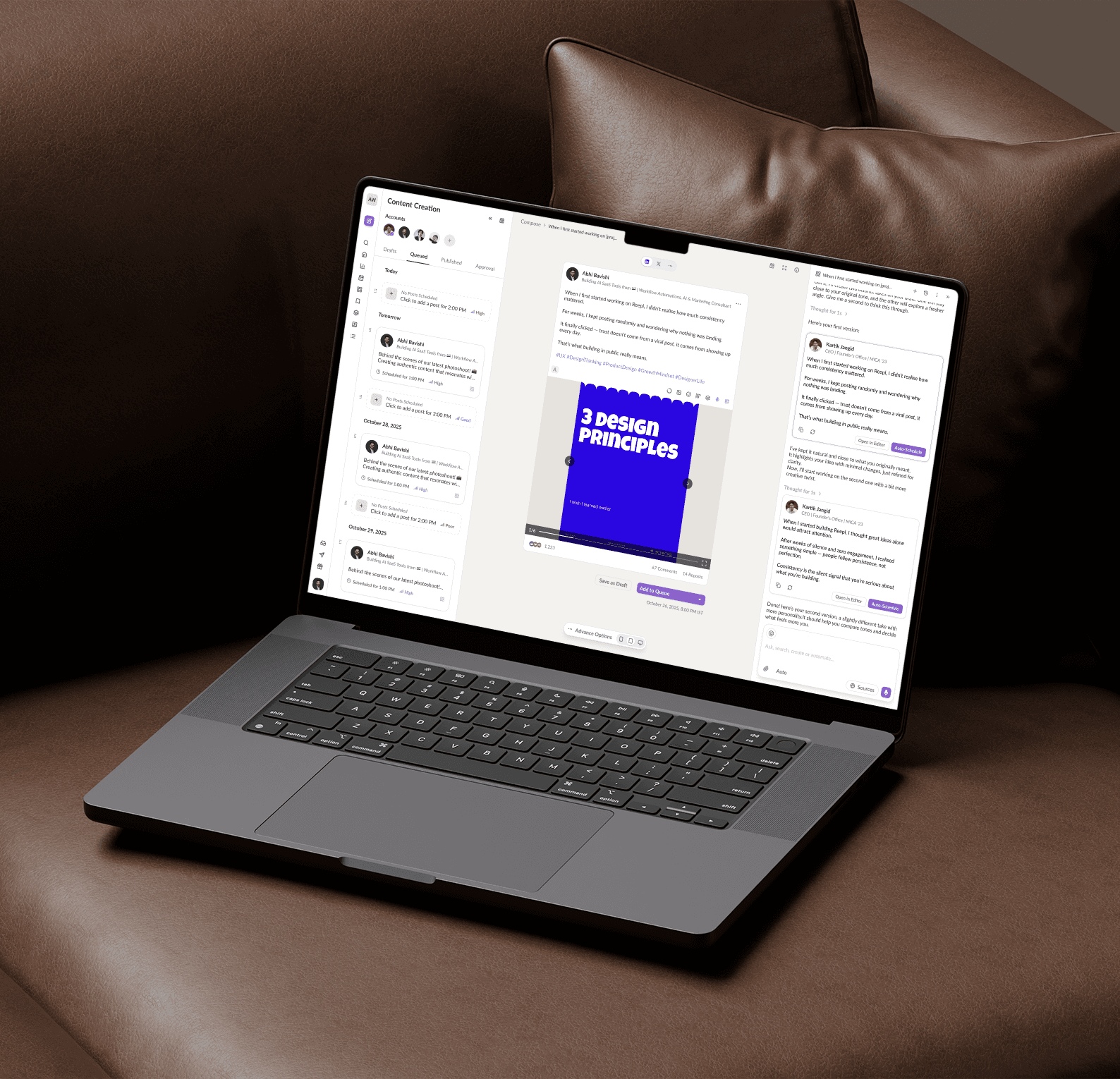
Content Hub Interface: Composer + AI Sidebar integration
Extension Redesign: Comment widget dual-path interaction
Onboarding Flow: Value-first vs. conversion-focused comparison
Design System: Token → Tailwind mapping + component library
User Flows: Agent Mode setup and Stories feature interaction
The Challenge
Context: Reepl (app.reepl.io) is an AI-powered LinkedIn productivity platform. When I joined, the product had fundamental UX problems preventing growth.
Critical Issues:
Navigation breakdown: Users couldn't perform basic tasks (going back, finding features)
Performance: MUI tech stack caused slow loads
Limited scope: Only content generation; missing CRM, scheduling, team features
Misaligned pricing: Complex structure didn't match user needs
Wrong segment: Built for general professionals, actual users were HRs/recruiters/job-seekers
Poor reviews: Extension criticized for "complex navigation" and "slow performance"
Core Problem: Architecture couldn't scale. We needed comprehensive redesign to become a complete LinkedIn suite.
Discovery & Research
Methods & Key Insights
User Interviews (n=25+)
HRs/recruiters need contact organization and list management for candidate tracking
Job seekers prioritize mobile accessibility and profile optimization
Agencies/creators value multi-account management and are willing to pay 3x more than other segments
Chrome Review Analysis (n=50+ reviews)
Top complaint: "Got lost trying to find basic features"
Second complaint: "Too slow to be useful"
Insight: Navigation and performance are table-stakes, not just features
Card Sorting (n=15)
Users expected workspace-based hierarchy (like Slack/Notion)
Analytics grouped with "growth tools," not "settings"
Content creation and scheduling mentally linked
Heuristic Audit → Top 3 Violations:
Poor information scent (features 4-5 clicks deep with no breadcrumbs)
Inconsistent UI patterns between extension and web app
No error recovery (users lost drafts, couldn't undo navigation mistakes)
Competitive Analysis:
LinkedIn tools (Shield, Taplio) focus on individual creators
Enterprise CRM (HubSpot, Salesforce) too complex for LinkedIn-specific workflows
Opportunity: Build professional-grade tool for agencies with LinkedIn-native CRM features
Research-Led User Pivot
Discovery: While product targeted "LinkedIn creators," actual users were:
40% HRs and recruiters
30% Job seekers
30% Agencies and content creators
Strategic Decision: Prioritize agencies/creators (highest willingness to pay) while serving HR/job-seeker needs through focused features (CRM, profile tools, mobile workflows).
User Personas (Clustered)
Persona 1: HR Professionals & Job Seekers
Why combined: Both use LinkedIn for talent/opportunity discovery with similar daily workflows
Key needs: Contact lists, activity tracking, quick responses, profile optimization
Pain points: Lost conversations, disorganized outreach, time-consuming tasks
Persona 2: Agencies & Content Creators
Why combined: Both manage multiple brands and need team collaboration
Key needs: Multi-account management, workspace collaboration, brand voice consistency, autonomous workflows
Business priority: Highest willingness to pay (3x) → platform features prioritize this segment
Design Strategy
Core Principles
Performance as Feature — Fast interactions aren't technical nice-to-haves; they're UX requirements
Progressive Complexity — Simple defaults with advanced features for power users
Context Preservation — Never lose user's place; auto-save everything
Keyboard-First — Command palette and shortcuts for efficiency
Unified AI Experience — Consistent AI patterns across sidebar, composer, extension
Information Architecture Redesign
Process
Conducted card sorting (n=15) to understand mental models, mapped user journeys to identify navigation pain points, and audited existing IA for violations.
Key Restructuring Decisions
1. Dashboard Innovation: Recently Viewed Items
Problem: 60% of sessions involved returning to features 4-5 clicks deep
Solution: Surface recently accessed items on dashboard for 1-click access
Impact: Solved #1 review complaint about "getting lost in interface"
2. Analytics Promotion
Before: Buried in settings
After: Top-level navigation
Rationale: Growth-focused users (paying segment) check daily
3. Workspace Hierarchy
Implemented familiar mental model (Slack, Notion)
Role-based permissions for teams and agencies
Account switching for multi-brand management
4. Universal Search + Command Palette
Before: Click-through navigation only
After: Keyword-operated shortcuts for hands-free navigation
Impact: Power users praised efficiency
New Top-Level IA
Dashboard (recently viewed, quick actions)
Content Hub (composer, calendar, ideas)
Analytics (performance, insights)
Library (collections, templates)
Contacts (CRM, lists, notes)
Settings (user/admin/AI three-tier structure)
Design System: Foundation for Scale
Strategic Approach
Token Alignment with Tailwind:
Mapped design tokens directly to Tailwind utility classes
Rationale: Time constraint + performance benefit (reduced bundle size addressing "slow app" complaints)
Dev impact: Zero translation errors, faster development
Component Prioritization:
Audited all planned screens
Ranked by reusability score
Built high-impact components first: buttons, inputs, cards, modals, sidebars, command palette
Cross-Platform Consistency:
Challenge: Extension and web app had diverged
Solution: Unified design system for both platforms
User feedback: "Interface feels cohesive now"
Documentation:
Usage guidelines for each component
Accessibility requirements (WCAG 2.1 AA)
Code snippets for common patterns
Maintained Figma Dev Mode for specs
Key Feature: Content Hub
Problem
Task analysis showed users needed flexible composition environment with AI assistance that didn't feel intrusive.
Solution: Three-Panel Layout
Left: Content management (Published/Drafts/Scheduled tabs, account switcher)
Center: Composer with LinkedIn-like preview (familiar = lower cognitive load)
Right: AI Sidebar (persistent assistant)
Design Iteration: Initial versions tried fitting everything in one view → overwhelming. Through testing (n=12), learned users need focused composition space with AI available but not dominant.
Stories Feature: Authentic Content Generation
Challenge: Generic AI content feels inauthentic. How might we extract real user experiences?
Conflict Resolution:
Founder wanted: Modal dialog approach
I hypothesized: Sidebar approach would feel native
Process: Built both prototypes, tested with users (n=8)
Results: Sidebar = 40% faster completion, 7/8 preferred
Outcome: Adopted sidebar, established data-driven decision culture
Final Flow:
Curated story prompts as clickable cards
Sidebar opens with contextual questions
Adaptive questioning based on post type
Generate variants → edit → one-click schedule
Key Feature: AI Sidebar (Chat + Agent Modes)
Problem
Users needed both quick AI assistance and autonomous content creation for different contexts.
Solution: Dual-Mode System
Chat Mode (Ad-hoc assistance)
Natural language for tasks: "Create monthly calendar from my Google Doc"
Connected to sources (Notion, Docs, Airtable)
Executes actions: create, schedule, edit
Maintains conversation context
Agent Mode (Autonomous workflow)
User insight: "I travel constantly. Can't create posts at my computer."
Solution: Background agent creates content, sends mobile-friendly approval (Slack/WhatsApp)
Setup: Connect sources → set posting rhythm → choose voice profile → select approval workflow
Operation: Agent generates batches → user approves from phone → auto-schedules
Design Decisions:
Clear mode selector at top (no mode confusion)
Always show context (connected sources, selected account)
Transparent permissions with clear opt-in
Extension Redesign: Addressing Review Complaints
Goal: Transform "complex navigation, slow" reviews to "simple, easy" reviews.
Comment Generation: Dual-Path Interaction
Before: Only generic chips, no length control, no personalization
User feedback: "Comments feel robotic"
After:
Quick Response Path:
Toggle defaults to "Quick"
Pre-defined types (Appreciate, Agree, Celebrate)
Word limit selector (Minimal/Concise/Detailed)
One-click insert
Personalized Path:
Toggle to "Personalized"
Text or voice input for user's perspective
AI combines input + post context
Maintains authentic voice
Intelligent Rewriting:
Icon transforms when text detected in input
Shows two options: standard generation or quick rewrite
Rewrite enhances what user already wrote using post context
Profile Enhancement (Job Seeker Focus)
AI-powered profile optimization suggestions (contextual, when viewing own profile)
Headline rewriting for discoverability
Bio enhancement with voice consistency
JD optimization for search rankings
Reepl Streak (Gamification)
Weekly activity dashboard (comments made, posts published)
Daily scoreboard and weekly timeline
Designed for job seekers and consistent creators
Calendar & CRM Features
Calendar:
Three views: Month (planning), Week (detailed), Agenda (scanning)
Drag-and-drop rescheduling
Visual status indicators (draft/scheduled/published)
CRM (HR/Recruiter Focus):
User-created contact lists with tags
Public/private visibility for team collaboration
Use cases: "Frontend Devs - Shortlisted," "Q4 Outreach - Warm Leads"
Private notes on profiles + interaction history
Settings: Three-Tier Architecture
Tier 1: User Settings (Profile, preferences, notifications)
Tier 2: Administration (Workspace, teams, permissions, billing)
Tier 3: AI Settings (Custom models, prompt library, voice profiles, MCP connectors)
Voice Profiles (Agency/Creator feature):
Create profiles per brand
Train on source material (past posts, guidelines)
Select profile when creating content
All AI responses match brand voice
Business impact: Supports higher-tier pricing for multi-brand management
Onboarding: Value-First Approach
Failed Approach (Conversion-Focused)
Gated Pro features immediately
Required credit card for trial
Showed security badges (felt like trust compensation)
Result: High abandonment
Successful Approach (Value-First)
Goal identification (Sales, Recruiting, Personal Brand, Job Seeking, etc.)
Desired outcomes (Generate leads, Grow agency, Build brand)
Value framing ("If LinkedIn worked for you, what impact could it create?")
Time investment question
Two clear paths: Use extension OR explore web app
Free trial from start (no credit card)
Result: Reduced abandonment significantly, achieved first 10 paying customers within 2 months
Results & Impact
Quantitative
Zero → 10 paying customers in 2 months post-launch
Chrome extension rating improvement with sentiment transformation
Improved retention (users reporting higher satisfaction)
Salary increase granted for exceeding success metrics
Qualitative: Review Sentiment Shift
Before:
"Complex navigation makes it impossible to use"
"Too slow, can't get anything done"
"Got lost trying to find basic features"
After:
"Simple to use compared to what they had before"
"Easy to navigate and find what I need"
"Much faster and more intuitive"
Key Success Factors
Research-driven decisions (every major choice validated with users)
Performance prioritization (addressed "slow app" through tech + interaction design)
Navigation clarity (IA restructuring + Recently Viewed innovation)
Data-driven conflict resolution (prototypes → testing → objective decisions)
Value-first onboarding (demonstrate before asking for commitment)
Reflections
What Worked
Dual-mode AI pattern served diverse use cases without feature bloat
Sidebar consistency created learnable interaction model
Recently Viewed innovation elegantly solved deep-navigation problem
Data-driven conflicts with founder built trust and established methodology
Extension focus on review feedback transformed user sentiment
Challenges Overcome
Scope management: Used impact/effort matrix to prioritize high-value features
Cross-platform consistency: Unified design system despite technical constraints
Simplicity vs. power: Progressive disclosure served both novice and power users
Future Opportunities
Enhanced analytics with prescriptive recommendations
Team collaboration workflows (async feedback, approvals)
Native mobile app for Agent mode
Complete job alert + resume tailoring features (in development)
Conclusion
This redesign transformed Reepl from a struggling single-feature tool to a comprehensive LinkedIn productivity platform achieving product-market fit. The shift from negative reviews to positive feedback praising simplicity validated that systematic UX methodology—research, iteration, testing—delivers measurable impact on both user satisfaction and business outcomes. The founder's recognition through salary increase reinforced that investing in rigorous design processes pays dividends even in fast-paced startup environments.